PLAYER SUPPORT
Keep playing.
Keep creating.
Help for every side of Cubeluma: place blocks, swap into cascades, collect badges and animate your ideas.
Find your answerUpdated October 17, 2026 · iOS 1.0.1
CHOOSE YOUR TOPIC
One game. More to explore.
Adventure
Clear goals. Reveal your mosaic.
Get help →02Endless Match
Swap, cascade and chase your best.
Get help →03Block Studio
Make an animation from your clears.
Get help →04Badges
Collect achievements tied to your play.
Get help →05First steps
Learn by making the real move.
Get help →↗Saved progress
Return to your board and creations.
Get help →YOUR PLAY CONNECTS
A clear can start something new.
- Clear Adventure goalsClear lines and collect shapes.
- Keep the cleared shapeUse the shape as a Studio stamp.
- Create and play your framesCopy a frame, change a detail and play your animation.
PRACTICAL ANSWERS
From your next move
to your next creation.
Gameplay, unlocks, saved works and troubleshooting.
How your data is handledHow do I play Adventure?
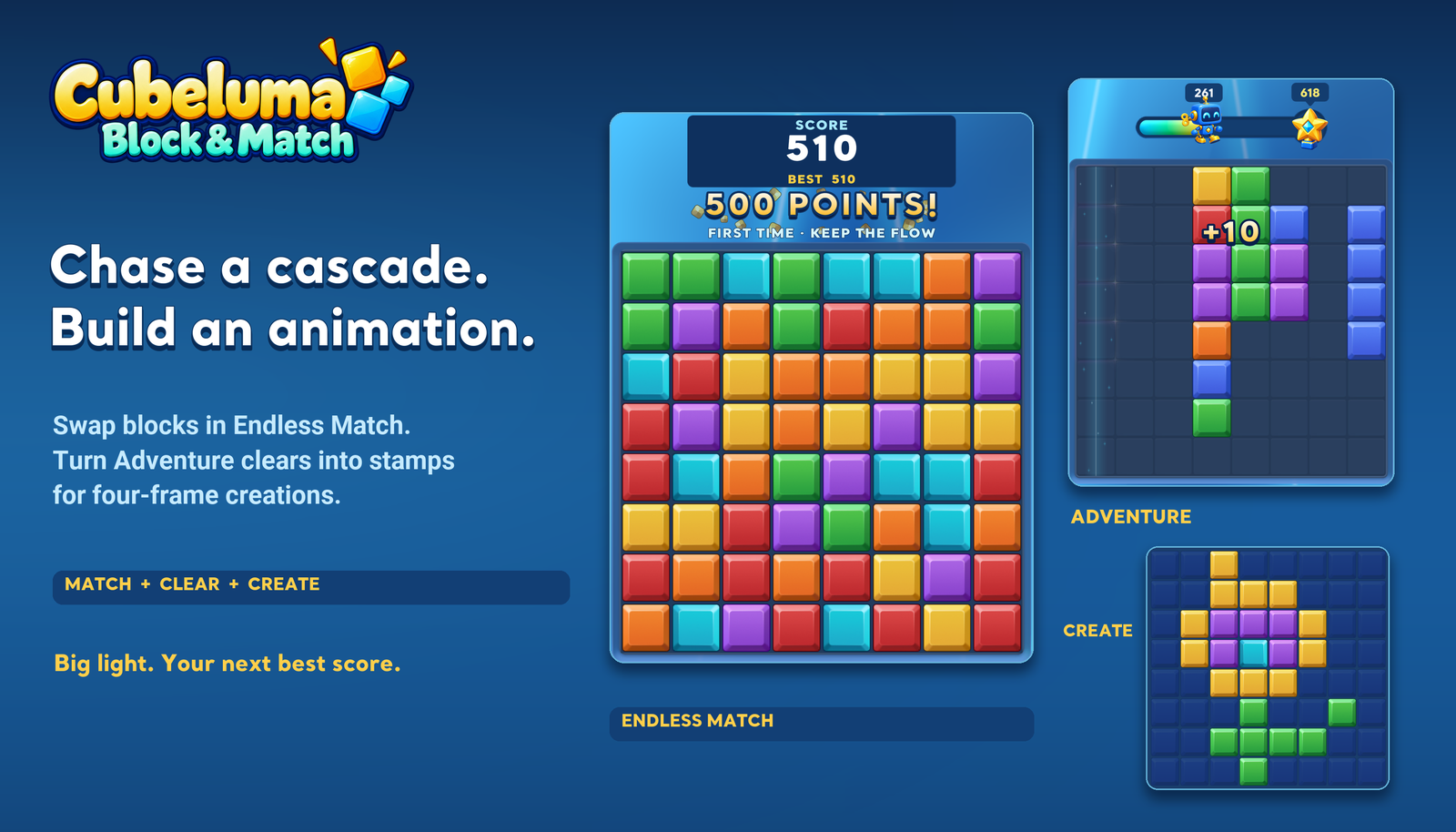
Drag shapes onto the 8 × 8 board and fill rows or columns to clear them. Each level asks for a displayed score or specific goal icons. The robot score challenge appears at level 7 with a 618-point target. Each win reveals another mosaic tile; tap the trail artwork to inspect it.
How does Endless Match work?
Swap adjacent blocks to match three. Blocks fall and refill after a clear. Four in a line earns a beam, T/L earns a blast, and five in a line earns a color-clearing prism. Tap or swap a special to use it. The current score appears above the board and your best score appears on Home.
When does an Endless Match run end?
There is no timer or move limit. After all cascades settle, the run ends when no clearing swap or usable special remains. The game does not automatically shuffle. Invalid swaps return without a penalty. Use Hint to find a legal move, or Play Again after a result.
Can I leave and resume Endless Match?
Use Home to save the current board and score, then reopen Endless Match to continue. New Game asks before replacing the run. Your personal best is kept separately. Milestone celebrations occur after cascades settle and allow continued input.
What do the first five lessons teach?
Start by clearing lines, then use the shape and color from a clear as a stamp. Rotate a stamp and compare a different placement, copy and edit animation frames, then select an artwork frame whose marked targets return to the puzzle board. Hand gestures show the actual required action.
What can I make in Block Studio?
Draw on an 8 × 8 canvas using a brush or stamps collected through Adventure. Rotate shapes, copy and change four frames, play the animation and save it. My Works holds up to 24 editable creations on this device.
How do I collect drawing stamps?
Successful Adventure clears record the shape you placed as a reusable stamp. Open the in-game Studio entry or Home > Block Studio, then MATERIALS > STAMPS. Endless Match scores and specials do not supply Adventure stamps.
How do I earn the six Endless Match badges?
Complete your first clear, create a beam, trigger three clearing waves in one action, create a prism, reach 5,000 points in one run, and reach 50,000 in one run. Adventure progress does not count toward these six goals. The album has six additional Adventure badges.
Why does a hand guide appear on the badge button?
After your first exclusive badge unlock, returning Home teaches collection through Badges > Collect Badges > Collect. Completing the claim finishes the guide; opening the page alone does not. Your Endless Match board stays saved.
Can I sync or recover my progress?
Boards, scores, badges, Studio drafts and saved creations stay on this device. There is no game account, public gallery or developer-operated cloud sync. Deleting the app or changing devices can lose local data. Device backups, if enabled, are managed by your device or backup provider.
Do I need an internet connection?
Puzzle play and Studio editing use local data. The app may contact public websites for a network time check and can fall back to the device clock. Opening support/privacy links and sending email need a connection.
The game freezes or has no sound. What should I try?
Close and reopen the app, restart your device, check free storage and install available updates. Check audio settings, device volume and connected audio output. Avoid deleting the app as a first step because progress is local. Include the game mode and steps when reporting a problem.
How do I report a bug or make a privacy request?
Email heydtehn484@gmail.com. Include app version, device model, iOS version and steps to reproduce. Screenshots are optional; hide unrelated personal information. Never send passwords or payment details.
CUBELUMA: BLOCK & MATCH
Play a puzzle.
Make something from it.
Your Adventure clears become drawing stamps for four-frame animations. Endless Match offers a separate score challenge with its own achievements. Explore at your own pace, then come back to something you made.